⚡ Key takeaways
- Danmaku (弹幕) are comments that fly across a Bilibili video at the exact second they were posted.
- Because every danmaku has a timestamp, a spike in danmaku = the video's highlight.
- Download them without a login for $0.05 per 1,000 with the Bilibili Scraper.
- Need a keyword filter and free per-video highlight summaries? Use the Bilibili Danmaku Scraper.
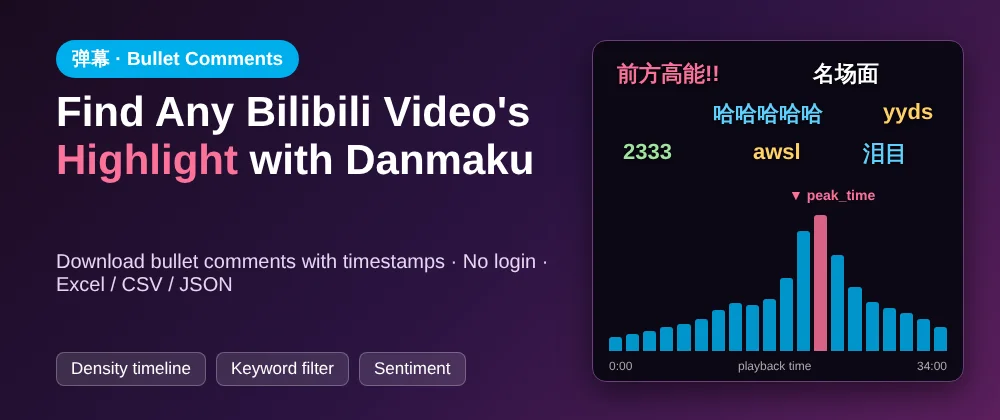
You open a Bilibili (哔哩哔哩, B站) video and the screen explodes with text: 前方高能!!, awsl, 2333, flying right over the picture. Those are danmaku (弹幕, "bullet comments"), and they're one of the most fascinating datasets on the Chinese internet. Every single one is pinned to the exact second a viewer reacted.
What is danmaku (弹幕)?
Danmaku literally means "bullet curtain". On Bilibili, each danmaku is a short comment that viewers post at a specific second of the video. Everyone who watches later sees it fly across the screen at that same moment, so watching feels like watching with thousands of people.
Some you'll see everywhere:
| Danmaku | Meaning |
|---|---|
| 前方高能 | "High energy ahead!" (something big is about to happen) |
| 名场面 | An iconic scene |
| awsl | "Too cute, I'm dying" |
| 2333 | Laughing (like "lol") |
| 泪目 | Tears in my eyes |
Why is danmaku such good data?
Unlike normal comments, every danmaku has a timestamp:
- Highlight detection: where danmaku spike, something happened.
- Second-by-second audience reaction: for trailers, ads, product launches or game reveals.
- Sentiment over time: when do viewers love it, and when do they complain?
- Clip finding: creators use spikes to decide which moments to cut into shorts.
How do you download Bilibili bullet comments without a login?
Bilibili has no public API for danmaku, and there's a catch: logged out, Bilibili serves danmaku from two different endpoints. One gives a sample across the video's whole lifetime, the other the most recent few thousand. They barely overlap, so most simple scripts miss a lot.
Both of my scrapers merge the two sources. On a 34-minute video that gave 5,416 danmaku rows without logging in.
Which tool should you pick?
| You want… | Use | Price per 1,000 danmaku |
|---|---|---|
| Every danmaku, as cheaply as possible (plus comments, videos, UP主 if you need them) | Bilibili Scraper in danmaku mode |
$0.05 |
| Only danmaku that mention a keyword, plus a free highlight summary row per video | Bilibili Danmaku Scraper | $1 (summary rows free) |

Option 1: No code
- Open the Bilibili Scraper and click Try for free.
- Set What to scrape to
danmaku, then paste video links, or give it search keywords, UP主 (creator) IDs or the popular/ranking feed. - Click Start, then Export to Excel, CSV or JSON.
Example input: the danmaku of the top 10 search results for a keyword:
{
  "mode": "danmaku",
  "searchQueries": ["原神"],
  "maxVideosPerSource": 10
}
Each row is one bullet comment:
| Field | Meaning |
|---|---|
time |
Playback position in seconds |
content |
The text |
mode, fontsize, color |
Scrolling / top / bottom, size, colour |
ctime |
When it was sent |
bvid, page |
Which video and part |
Option 2: Python
git clone https://github.com/Dunkmap/Bilibili-Scraper
cd Bilibili-Scraper
pip install -e .
bili danmaku BV1xx411c7mD -o danmaku.csv
How do you find a video's highlight from danmaku?
The quick way: a free summary per video
The Bilibili Danmaku Scraper with videoSummary: true adds one extra free row before each video's danmaku, with:
count: how many danmakudensity: a 20-slice timeline of how busy each part of the video ispeak_time: the busiest moment, which is usually the highlighttop_phrases: the most repeated phrasessamples: a handful of distinct texts
Add keywords and you only pay for danmaku that mention them, for example a brand or product name. Filtering happens before charging.

The DIY way: pandas
If you exported the full danmaku as CSV:
import pandas as pd

df = pd.read_csv("danmaku.csv")
df = df[df["content"].notna()]          # keep danmaku rows only

# danmaku per 30-second window
df["window"] = (df["time"] // 30) * 30
per_window = df.groupby("window").size()

peak = per_window.idxmax()
print(f"Highlight around {int(peak // 60)}:{int(peak % 60):02d}")

# what people were saying at the peak
at_peak = df[df["window"] == peak]["content"]
print(at_peak.value_counts().head(10))

per_window.plot(kind="bar", figsize=(12, 4), title="Danmaku per 30 s")
At the peak you'll typically see a burst of 前方高能, 名场面 or 哈哈哈.
What else can you do with danmaku?
- Sentiment analysis: label each danmaku positive, neutral or negative.
- Delta mode: for scheduled monitoring, return only danmaku that are new since the last run.
- Combine with comments: the Bilibili Scraper also gets comments with reply threads and UP主 profiles. See how to scrape Bilibili comments.